# Table of Contents
Script integrity hashing (TBC)
Note: «In fact,
haskellPackages(at the time of writing) is just an alias forhaskell.packages.ghc9103».
# Pinning versions
| Hackage version | Nix SHA-256 Sub-Resource Integrity (SRI) |
|---|---|
… |
… |
0.11.0.19 |
sha256-j/5LzXJy6SLkXxKuTOtsVbOyxoZtJjHgMiw7C7HQdnY= |
Re-packing of .tar.gz to the .nar (Nix Archive) format, to be
able to extract the SRI, can be done by using the following shell script and
a Hackage Downloads .tar.gz link:
#!/bin/sh

url="$1"

if [ "${url}" == "" ]
then
    echo "You must provide a URL: ./nixos_hash_sha256_nar.sh https://…/….tar.gz"
else
    nar=$(nix-prefetch-url --type sha256 --unpack ${1})

    echo "# Nixos SHA-256 SRI (Sub-Resource Integrity) for '${url}' is:"
    nix hash convert \
        --extra-experimental-features nix-command \
        --hash-algo sha256 --to sri ${nar}
    echo
fi# Available at Hackage and nix haskellPackages
To check if the latest version from Hackage is available as
a nix package, you need to check the following hackage-packages.nix file
from the NixOS > nixpkgs (haskell-updates branch) GitHub repo:
# hackage-packages.nix is auto-generated by hackage2nix -- DO NOT EDIT MANUALLY!

{
  pkgs,
  lib,
  callPackage,
}:

self: {
  …
  A-gent = callPackage (
    {
      mkDerivation,
      base,
      containers,
      mtl,
      process,
    }:
    mkDerivation {
      pname = "A-gent";
      version = "0.11.0.7";
      sha256 = "1p6yxa7rbw1bm6hdr2jwaxc8yhlf5m5byff6rqq5w63qsz76kmk4";
      libraryHaskellDepends = [
        base
        containers
        mtl
        process
      ];
      description = "Polite & well educated LLM agent with excellent manners that always behaves well";
      license = "(SSPL-1.0 OR AGPL-3.0-only)";
    }
  ) { };
  …
}
If the desired package is present, as it is the case, we can now just copy the
short hash, for example: 9a998f5·3 days ago History, and pin the packages as
described at:
#! /usr/bin/env nix-shell
#! nix-shell --keep --pure -i runghc
#! nix-shell --keep --pure -p cacert curl git
#! nix-shell --keep --pure -p 'haskell.packages.ghc9103.ghcWithPackages (ps: with ps; [A-gent])'
#! nix-shell --pure -I nixpkgs=https://github.com/nixos/nixpkgs/archive/9a998f5.tar.gzNote: In some cases, the short hash can’t be used due to collisions. In those cases you MUST use the full
SHA-256hash.
# Available at Hackage but not at nix haskellPackages
You will need to use the nix hash information from the table above, and add it
to your script files header as such:
#! /usr/bin/env nix-shell
#! nix-shell --keep --pure -i runghc
#! nix-shell --keep --pure -p cacert curl git
#! nix-shell --keep --pure -p '(haskell.packages.ghc9103.extend (self: super: {pin = self.callHackageDirect { pkg = "A-gent"; ver = "0.11.0.19"; sha256 = "j/5LzXJy6SLkXxKuTOtsVbOyxoZtJjHgMiw7C7HQdnY=";} {};})).ghcWithPackages (ps: with ps; [ pin ])'w
Due to the limitations of nix scripting, we sadly need to pass the package
pinning as a one-liner (horizontal scroll code block from above). However, for
the sake of transparency, we are going to explain in detail:
haskell.packages.ghc9103.override: As there are always some kind of issues with thecontainerspackage as a dependency, we therefore override the current packages default with a specific version from Hackagehaskell.packages.ghc9103.override{ overrides = self: super: { containers = haskell.lib.dontCheck(self.callHackage "containers" "0.8" {}); }; }Note: It seems that we found a solution to handle both
Stackageas well asHackage. Works from version0.11.0.6.haskell.packages.ghc9103.extend: If the latest package hasn’t been made part of thenixHaskell packages, we can retrieve it directly from Hackage:haskell.packages.ghc9103.extend ( self: super: { pin = self.callHackageDirect { pkg = "A-gent"; ver = "0.11.0.19"; sha256 = "j/5LzXJy6SLkXxKuTOtsVbOyxoZtJjHgMiw7C7HQdnY="; } {}; } )haskell.packages.ghc9103.ghcWithPackages: Once we have updated the package definitions, we can now use the packages:haskell.packages.ghc9103.ghcWithPackages (ps: with ps; [pin])
# LSP support for IDE
It is ideal to use a LSP when defining scripts, as it will help greatly with speed, but certainly also correctness.
As mentioned before, you will need to ensure the latest Λ-gent package is
available for the systems current ghc (Glasgow Haskell Compiler). You can
achieve this by defining the following shell.nix:
################################################################################
##
## Λ-gent, (c) 2026 SPISE MISU ApS, https://spdx.org/licenses/SSPL-1.0
##
################################################################################

with import <nixpkgs> {};

let
  hpkgs = haskell.packages.ghc9103.extend (
    self: super: {
      pin = self.callHackageDirect {
        pkg = "A-gent";
        ver = "0.11.0.19";
        sha256 = "j/5LzXJy6SLkXxKuTOtsVbOyxoZtJjHgMiw7C7HQdnY=";
      } {};
    }
  );
in
mkShell {
  buildInputs = [
    ( hpkgs.ghcWithPackages (
        pkgs: [
          pkgs.pin
          pkgs.stylish-haskell
          pkgs.haskell-language-server
        ]
      )
    )
  ];
  packages = [
    emacs
  ];
}

# References
#
# - https://discourse.nixos.org/t/how-to-override-a-haskell-package-in-shell-nix
And typing nix-shell in the folder to enter the nix sandbox (type ghc-pkg list and you will see which packages are available). Afterwards, when you start
using your IDE with your LSP, it will then be aware of the selected Λ-gent
package.
Note: You will NOT be able to able to execute
nixscripts from inside anix-shellsandbox. You SHOULD therefore only use this approach to define scripts.
# Protection rings
If we look at the definition at Wikipedia:
«In computer science, hierarchical protection domains, often called protection rings, are mechanisms to protect data and functionality from faults (by improving fault tolerance) and malicious behavior (by providing computer security)»
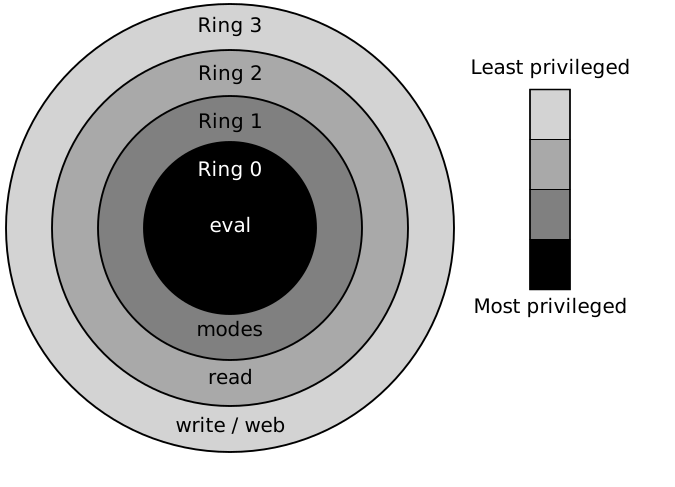
| Figure 0: Derived Priv rings (Hertzsprung) CC BY-SA-3.0 |
Notice that from eval (kernel or core), we will be able to execute all
restricted IO effects. We want to avoid being in ring 0 as much as
possible. Therefore, we would ideally branch out for each of the modes our
Λ-gents need to support.
Furthermore, we would like to keep branching in case some of the subprocesses need to read and write files as well as interact with web services.
For the sake of transparency and clarity, a ring (sunburst)
chart seems to reflect best how typical Λ-gents behave,
however, sankey diagrams might also do the trick.